

Trading tokens
Trade listed tokens on their supported networks, with a live quote and the payment asset shown in your panel.
Find your market
Use network filters and the asset page to check the token, its chain, current price, and available liquidity.
Buy or sell
Buy spends the panel’s payment asset. Sell uses the token quantity you enter. Balance presets use the available input asset.
Review the quote
Check expected output and minimum received. Wallet approvals and transaction confirmation complete the selected route.
Read the token page
The asset name and network badge identify the market you opened. The header shows market cap, token price, 24-hour volume, route liquidity, and supply when data is available. Liquidity describes the trading route; it is different from market cap.
Use the chart interval, range, and style controls to explore price history. Activity shows trades recorded by Instincts, Instincts shows posts for the asset, and About provides asset information. A historical chart point can differ from the latest header price and from an executable quote.
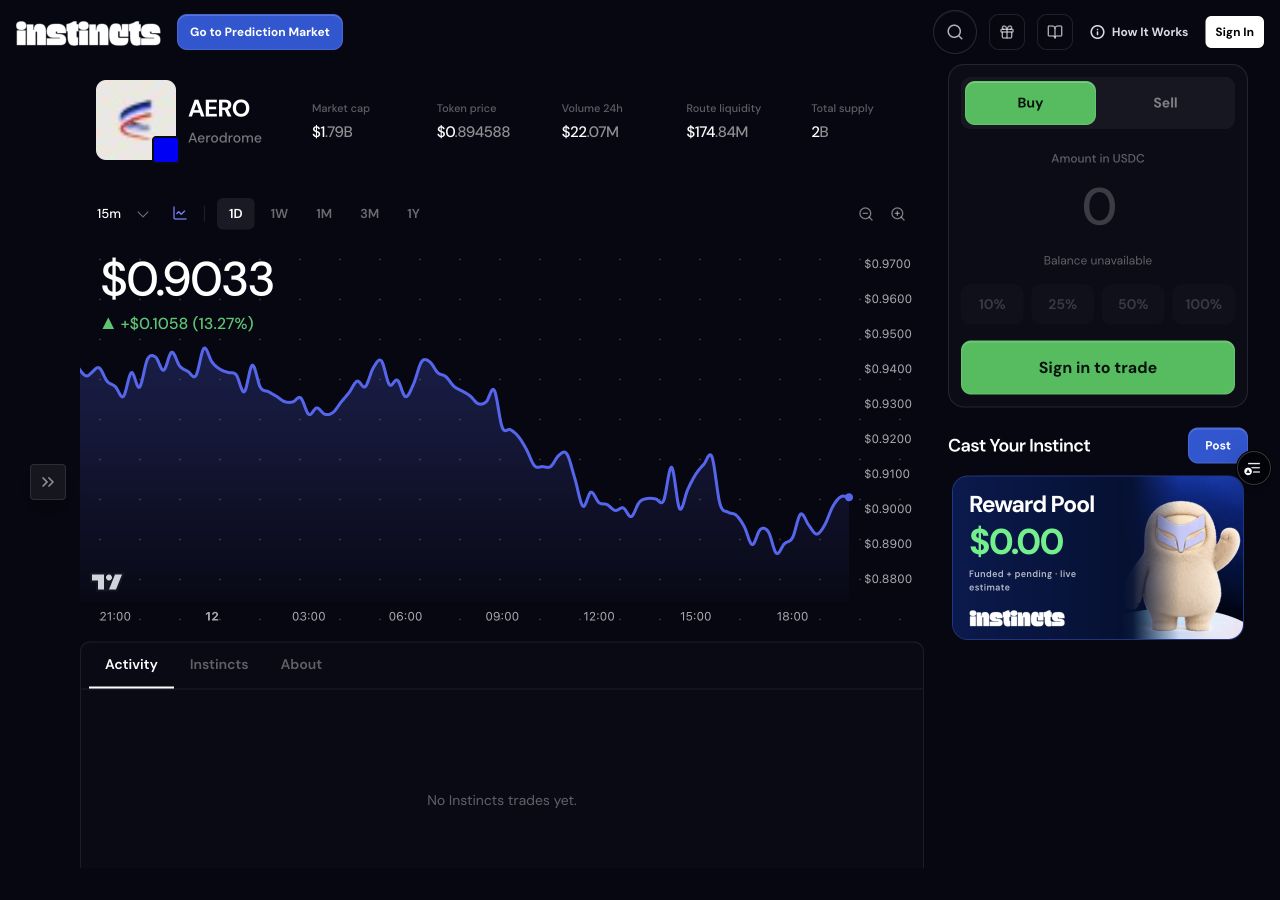
Enter a buy or sell
Choose Buy and enter how much of the displayed payment asset to spend. Choose Sell and enter the number of tokens to sell. Read the amount label rather than assuming every field is in dollars. The 10%, 25%, 50%, and 100% shortcuts calculate from the available input balance; they stay disabled when that balance is unavailable.
On desktop, Review buy or Review sell gets a quote, followed by the confirmation control. On mobile, open Buy or Sell, enter an amount using the trade screen, and use its slide control to start the quoted execution. The receive amount shown before quoting is an estimate.
Use the payment network your route supports
A connected external wallet signs direct token trades on the market’s network. The app requests the required network when preparing quoted wallet calls. Approve a network change if your wallet asks, and keep enough native currency for gas as well as the asset you are spending.
For an Instincts wallet, an enabled managed route can use Base USDC to reach supported markets on another chain. That flow may bridge funds or use available prefunded liquidity. It has its own progress tracking, and supported routes depend on current availability. Funds on an arbitrary network are not automatically spendable in every token market.
When Fund from another network is available, the shared Instinct Router can transfer a supported asset from a separate connected wallet into this market’s payment asset in your selected trading wallet. Review and complete that funding transfer first, then request a fresh buy quote. Funding does not itself buy the market token.
Understand the quote and wallet prompts
A token quote shows the expected output and Minimum received. The direct token ticket currently uses 1% slippage protection, and execution refreshes the quote. The displayed minimum is the amount protection for that route, not a promise to execute at the historical chart price.
A token approval allows the quoted contract to use the required asset; the swap transaction performs the trade. Your wallet may therefore show more than one prompt. Keep the account and trade unchanged while those calls complete. A rejected approval, insufficient gas, unavailable route, or changed quote can stop execution.
Check the completed trade
Wait for Trade confirmed or the managed route’s completed status. Use View transaction when offered to inspect the on-chain receipt. A managed sale can have a return-to-Base stage before its proceeds are available as Base USDC; the swap alone does not complete that return.
After a buy, Post your Instinct lets you create a call for the asset. Selling can change the holding eligibility of an active Instinct. If the route is still pending or asks for recovery, follow its status rather than submitting the same trade again.